I founded Perch Classroom, LLC to make the everyday work of running an academic enrichment center easier. I built the platform solo, starting with student attendance and staff hours, then adding a guardian experience. Previously called Clocker.
The front desk
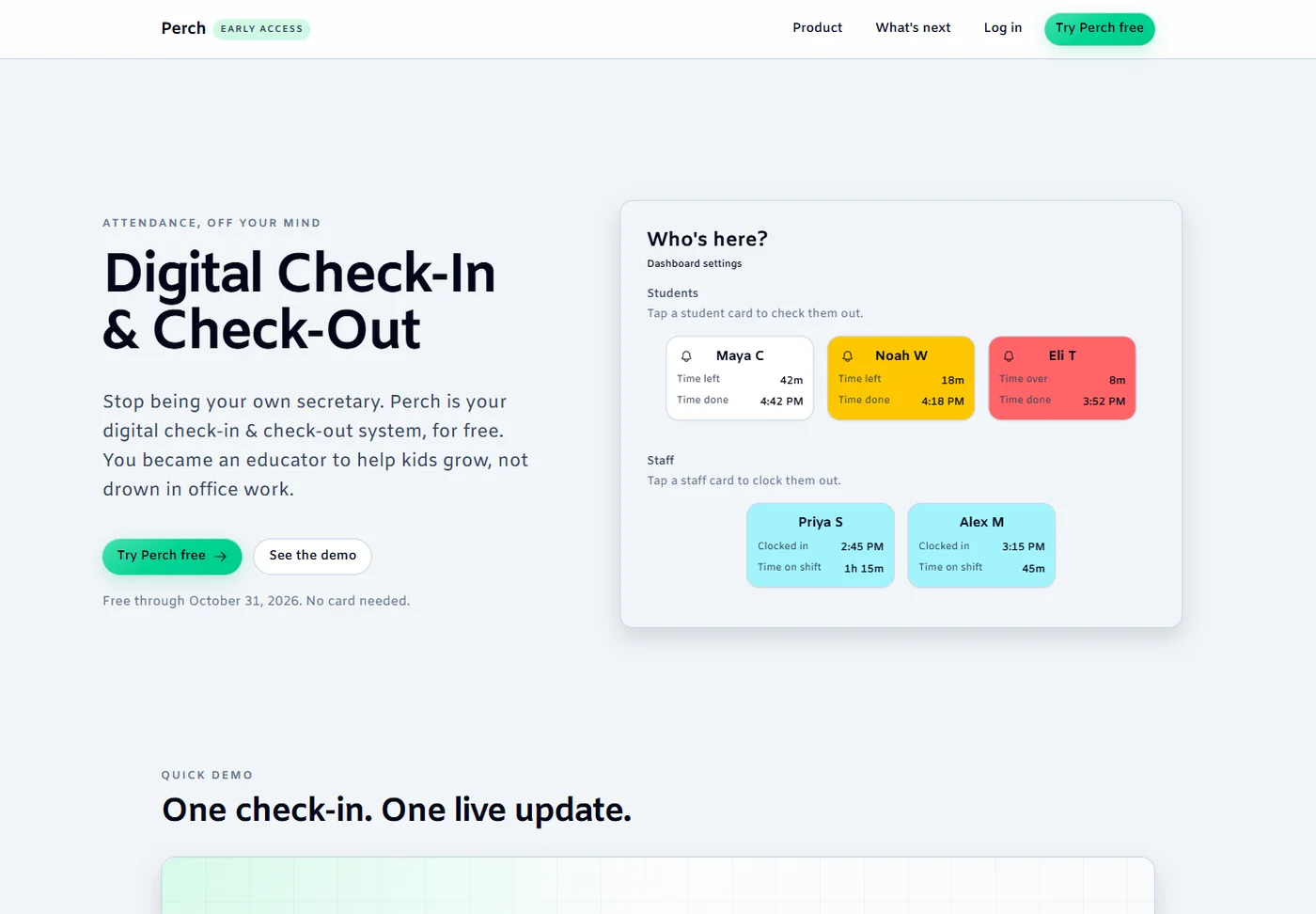
Students check in and out by name or barcode. A live dashboard shows who is in the center; saved attendance records make the day easier to review. Staff use the same check-in flow to record work hours, and centers can export their records.
The public product demo
Perch public homepage showing its sample live attendance dashboard. These are demo student and staff cards, not pilot customer records.Original source ↗
Keeping guardians connected
The guardian progressive web app connects families with their students. Guardians can see student progress and time spent in class, and receive pickup alerts. Web push avoids a per-message SMS charge. Three of four pilot owners requested pickup alerts.
A dated pilot snapshot
As of September–October 2026: 5 pilot centers, owned by 4 owners; 336 students; 4,758 attendance records; 113 guardian accounts; and 33 guardians with push enabled. These are pilot figures from my own records, not paying-customer or revenue claims.
From conversations to pilots
I interviewed 20 center owners at the 2026 North American Instructors Conference. Four owners, representing five centers, joined the pilot. All five pilot centers came from those conversations. Building the requested features shaped the product.
How it is built
Next.js provides the application, Supabase supports its data layer, and Vercel hosts it. Owners and guardians have different experiences. Development runs through GitHub issues, branches, and pull requests, with Playwright end-to-end checks.
Work still ahead
The pilot centers are on free trials. Overlapping, rolling class time slots remain unresolved. The public website describes scheduling as coming next. A push-outbox total is not included here because its sent status has not been verified.
SureRise
An iPhone and Apple Watch alarm for heavy sleepers with roommates. September 2024–January 2026.
I wanted an alarm that would wake me without waking my roommates. SureRise pairs a persistent Apple Watch vibration alarm with an iPhone companion, so stopping it requires reaching for the phone.
iPhone companion
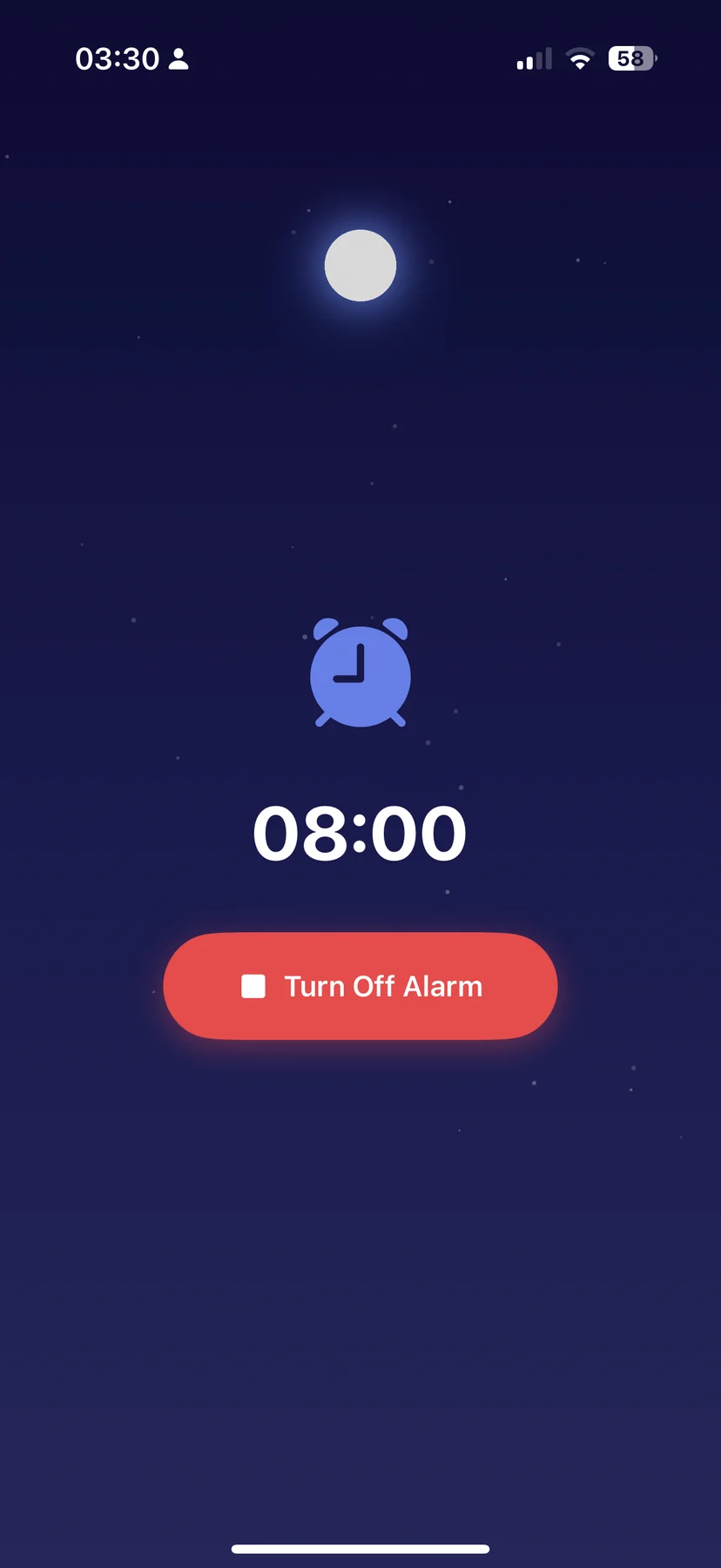
Original SureRise iPhone screenshot with an 08:00 alarm and Turn Off Alarm button.Original source ↗
Apple Watch alarm
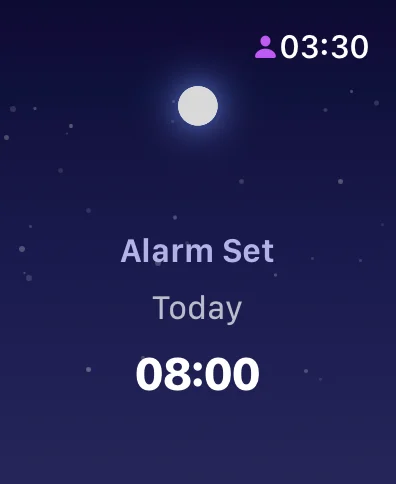
Original SureRise Apple Watch screenshot showing Alarm Set Today at 08:00.Original source ↗
Working around the limits
The main challenge was Apple’s background execution limits. The watch implementation uses WKExtendedRuntimeSession to schedule a session and sustain the alarm. WatchConnectivity carries alarm state and stop commands between the watch and phone.
The wake-up interaction
Randomized haptic patterns vary vibration types and intervals. The watch schedules the next occurrence of the chosen time and remembers the last selection. The phone displays alarm state and provides the stop control.
A working personal prototype
Built with Swift and SwiftUI for iOS and watchOS. The background workaround worked in my testing, but the app has no established user base and development has stopped. It remains a personal project, with source and original device screenshots available.
Read4Me
A Python document-to-speech pipeline built for reading-heavy coursework. November–December 2025.
I built Read4Me over a weekend so I could listen to course readings instead of reading every page on screen. The starting point was wanting an alternative to a text-to-speech subscription.
From PDF to one track
The dispatcher passes a PDF to pdfplumber for text extraction. The speech module splits that text into manageable requests for OpenAI text-to-speech. It saves MP3 parts and merges them into a single track locally.
Small, separate modules
file_to_speech.py coordinates the pipeline. pdf_to_text.py extracts text; text_to_speech.py handles chunking and synthesis; audio_merger.py stitches parts using pydub and ffmpeg. The code separates document handling from audio generation.
Usage-based synthesis can cost less than a subscription for light-to-moderate use. My comparison was a model, not a measured annual saving. More listening means more API cost, so it is not automatically cheaper at every usage level.
What the tool needs
Python, the OpenAI client, pdfplumber, pydub, and a local ffmpeg installation. Synthesis requires an API key supplied locally. It is a local pipeline rather than a hosted service; no subscriber or adoption figures are claimed.
Goaly
A team-built learning and technique-coaching prototype at CalHacks 12.0. October 2025.
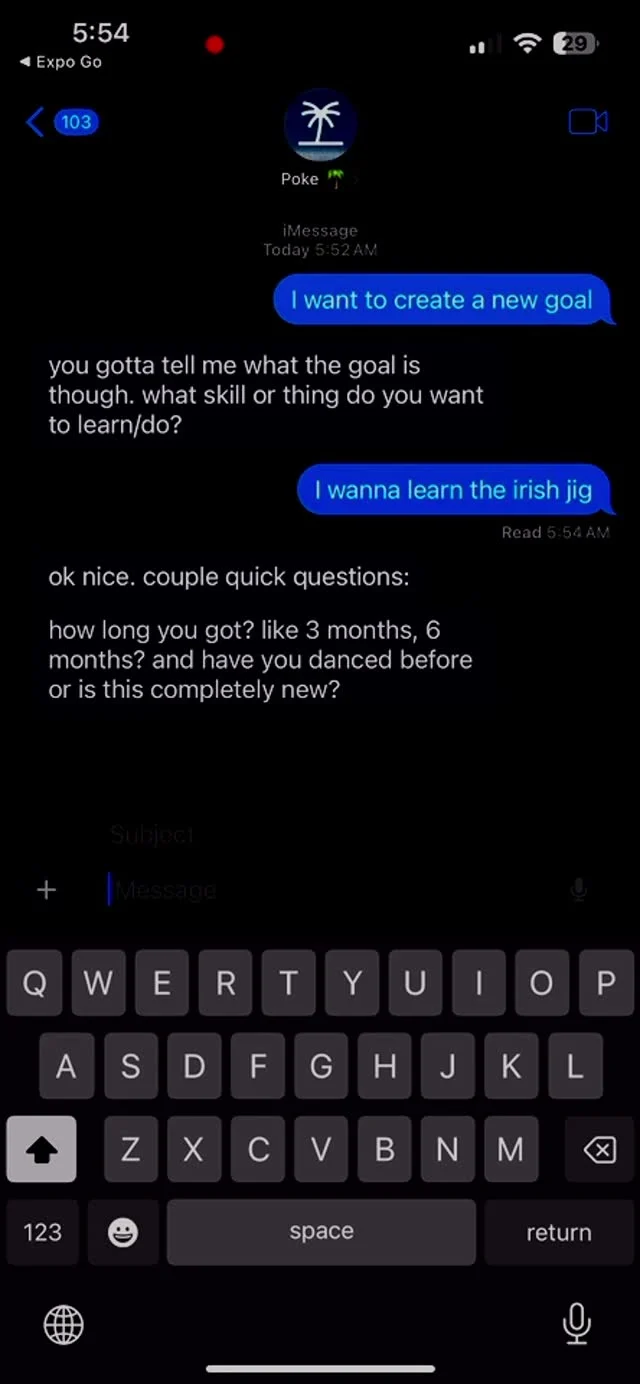
Built at CalHacks 12.0 with Karthik and Bisti. Goaly turns a learning goal into smaller tasks and asks for evidence of progress. Video analysis and accountability were central to the technique-coaching idea.
Tasks and resources
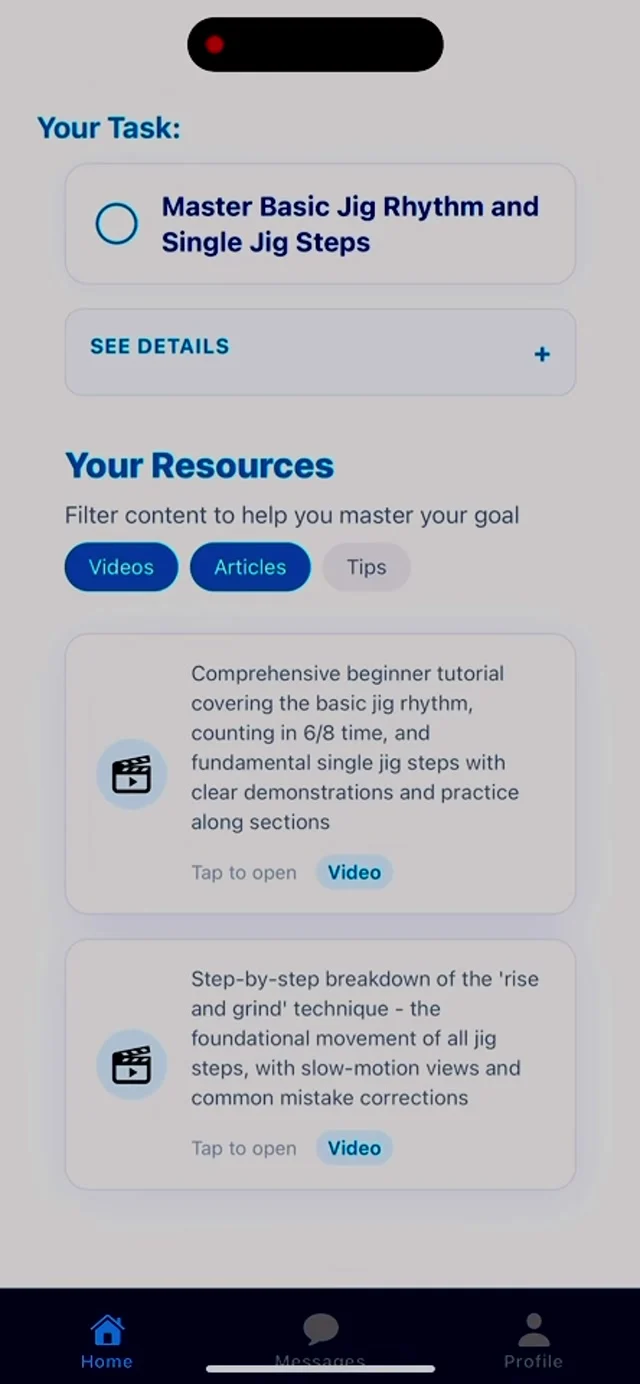
Frame from the original Goaly demo: a jig practice task, resource filters, and tutorial cards.Original source ↗
Conversational goal setup
Frame from the original Goaly demo: a Poke conversation asking what skill the user wants to learn.Original source ↗
The coaching loop
The project design connects goal setup, a milestone roadmap, daily tasks, and submission feedback. Rather than accepting a completion checkbox alone, the idea is to evaluate evidence such as a reflection, quiz, code, or video.
App and AI services
React Native and Expo supply the mobile interface; Python and FastAPI support the backend. My project record includes TwelveLabs video analysis and the OpenAI API. The team repository also documents Poke conversations and MCP tools for goals, tasks, and context.
Prototype scope
This was a hackathon prototype, not an established coaching service. The repository describes a broader roadmap, including adaptive tasks and long-term coaching; that roadmap should not be read as a claim that every feature was production-ready. No hackathon award is claimed.
BoilerRooms
Map-based housing review browsing for Purdue ACM SIGAPP. January–May 2025.
Housing, with location
I contributed map-based housing review browsing to Purdue ACM SIGAPP’s BoilerRooms app. The work puts housing reviews in a geographic context so students can explore places around Purdue.
My contribution
Integrated Google Maps and built housing highlights in React Native and TypeScript. This was work within a club app, rather than a product I built alone.
Shipped with the club
The feature shipped as part of the SIGAPP app. I do not have verified active-user or adoption figures. The concrete outcome is the delivered map and review-browsing work.
PracticeFlow
An experiment in generating swim practices from coach-written examples.
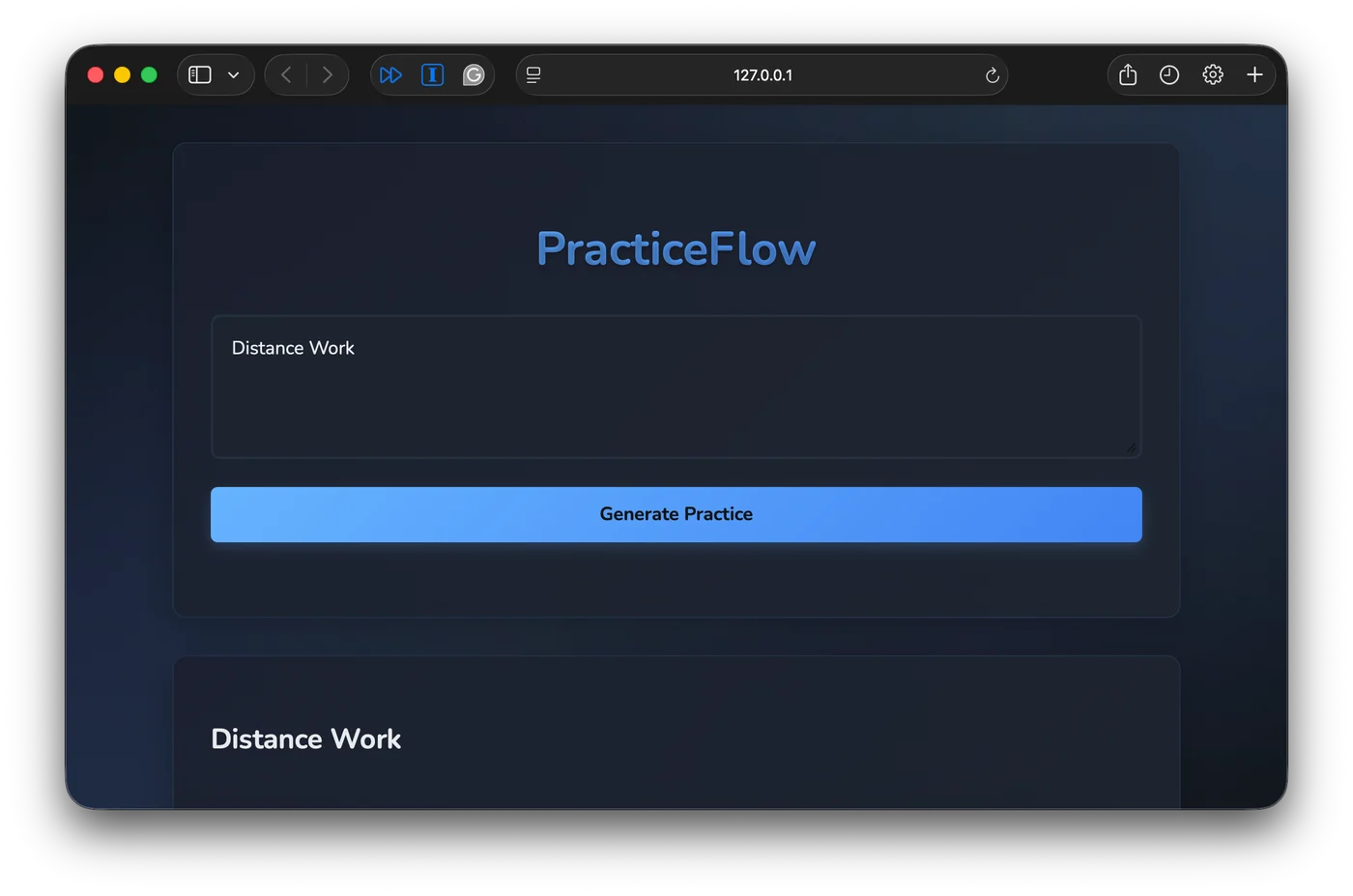
PracticeFlow explores whether previous swim practices can help draft new ones. The aim was to find, reuse, and adapt sets and session structures instead of starting every practice from scratch.
From swimming to building
I began the project in high school, thinking about how to recreate the structure of coach-written practices when I no longer had a school coach. It became an early experiment in turning a problem from my own life into software.
The practice generator
Original archived PracticeFlow screenshot: Distance Work entered in the web form above Generate Practice.Original source ↗
Retrieval before generation
Python converts historical PDF and CSV practice materials into text. Hugging Face embeddings and a FAISS index retrieve relevant context, then a local Llama 3 pipeline generates a response. The repository confirms LangChain embedding helpers and FAISS usage.
A local model, a web interface
The ML pipeline is Python-first. A small Node and Express server exposes a generate-practice endpoint, spawning the Python runner and returning practice text to the browser. Generation runs locally, with no per-request hosted inference fee.
What the experiment showed
My initial dataset had only 10 practices. The output quality was poor and nobody adopted the tool. Running inference locally was useful, but the project did not demonstrate reliable practice planning or measurable time savings.
A prototype for review
The generated text is a draft that needs a coach’s judgment. The screenshot is an archived interface capture dated October 2025, not evidence of a current service. The source is preserved as an experiment in retrieval and local inference.
Frictionless
A native iPhone time record with local storage and Live Activities.
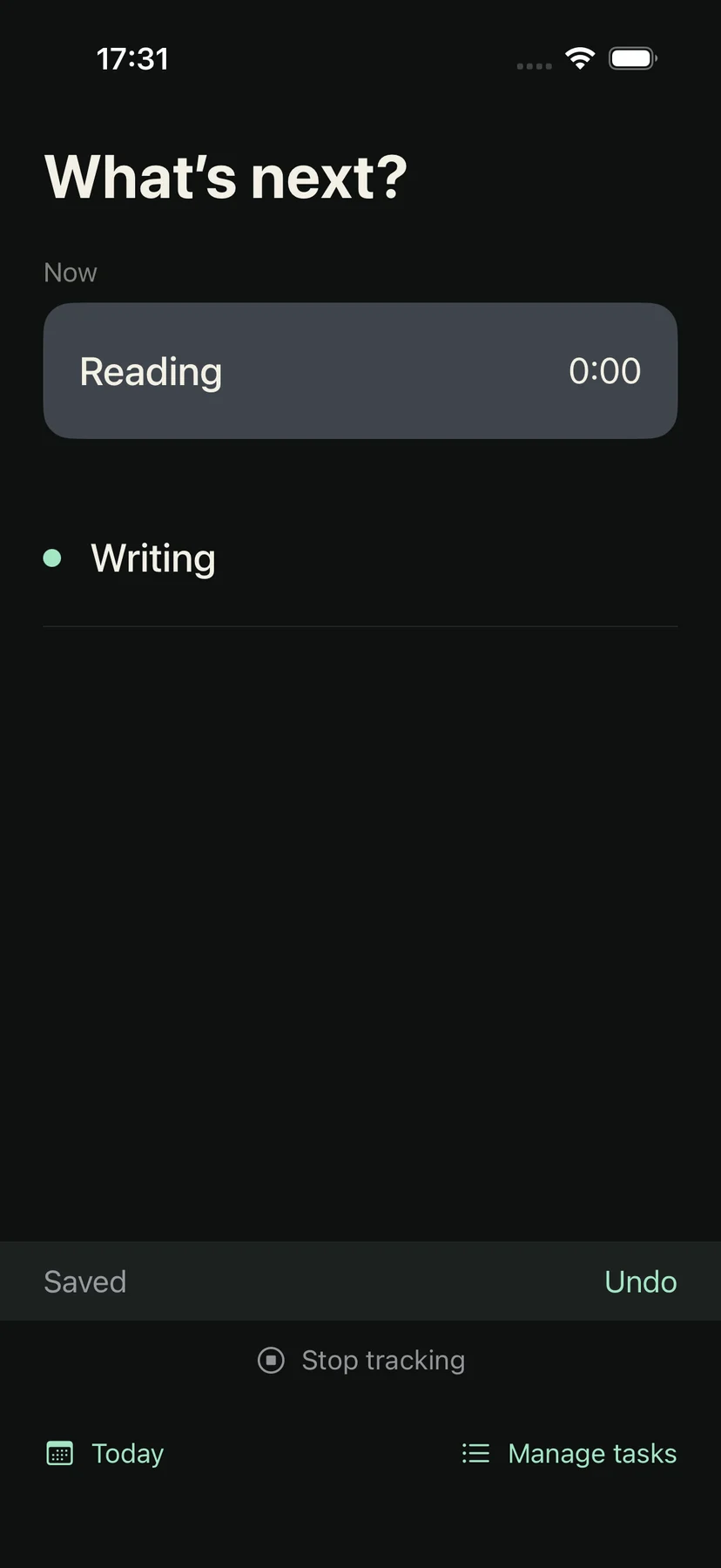
Frictionless is a minimal native iPhone time record. Tap a task to switch what is being recorded, then audit the day later. The project targets iOS 17 and newer and uses SwiftUI without third-party dependencies or a backend.
Choosing a task
Original Frictionless simulator screenshot showing its task picker and active recording.Original source ↗
Auditing a day
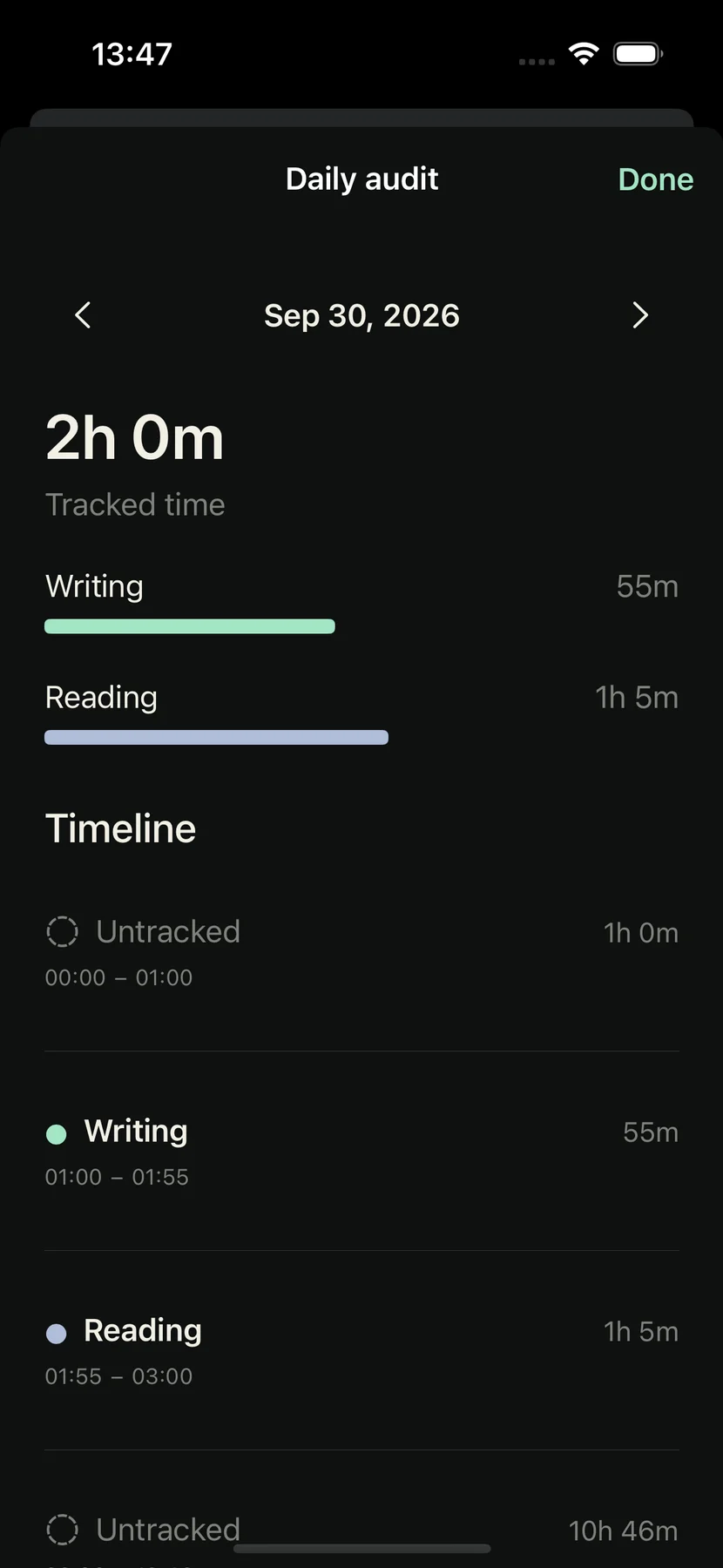
Original Frictionless simulator screenshot showing Writing and Reading totals with tracked intervals and gaps.Original source ↗
Corrections, without losing history
Tasks can be renamed, reordered, colored, or archived. The daily audit combines duration bars with a timeline of tracked and untracked intervals. Editing a shared switch boundary also adjusts the preceding task’s end; invalid overlaps and future edits are rejected.
Live Activity
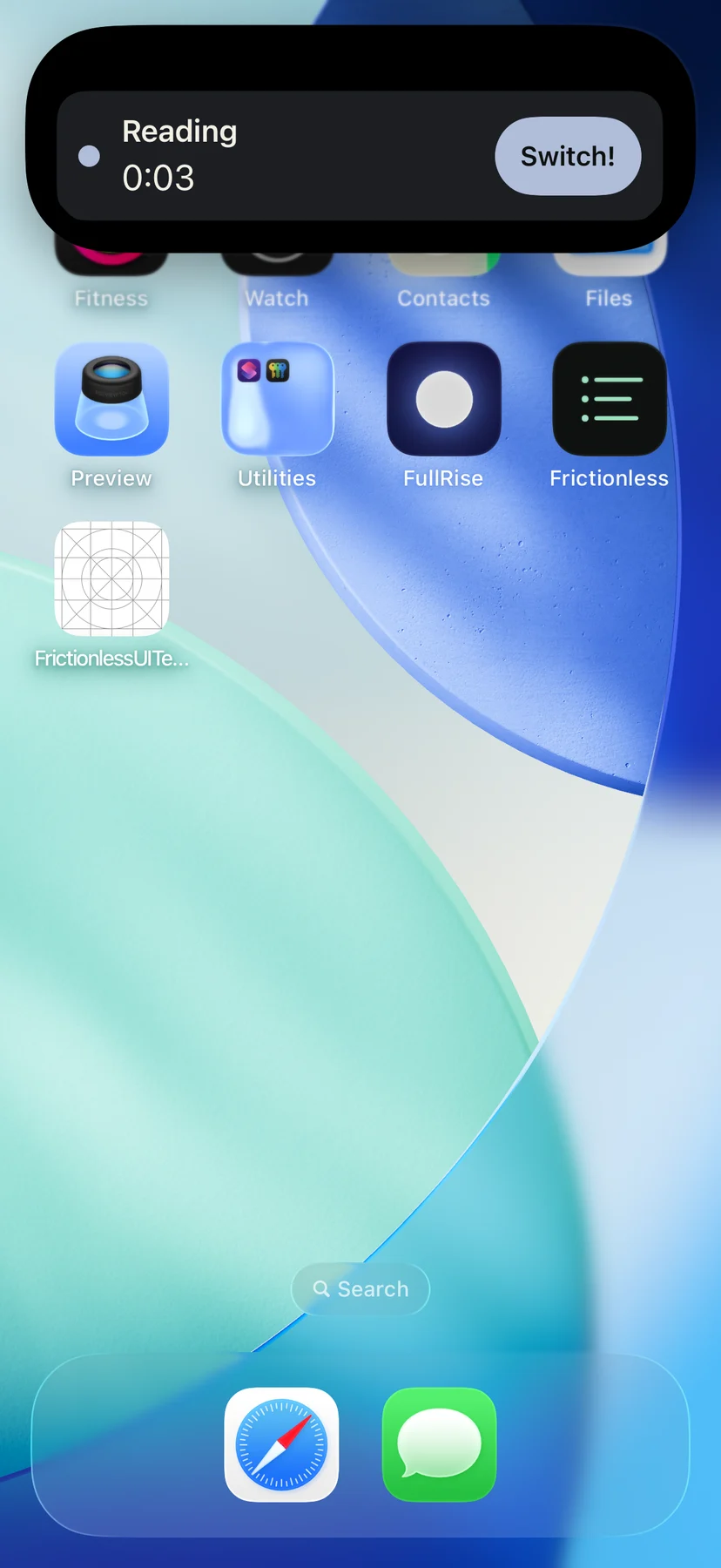
Original Frictionless screenshot of its expanded Live Activity with the current task and elapsed time.Original source ↗
The record is authoritative
Transactional SQLite in an App Group is shared by the application and intents. Saved recording remains authoritative if its presentation fails. Day totals use local calendar boundaries, including daylight-saving changes.
Visible while recording
A Live Activity presents the task color and elapsed time on the Lock Screen and Dynamic Island. Its Switch control opens the task picker. The repository includes simulator verification and lists the physical-device checks still needed.
A partial contribution to a Purdue SIGAPP club discovery app, beginning August 2025.
Finding campus communities
BoilerBuzz was a React Native and TypeScript club discovery app developed through Purdue SIGAPP. I contributed during part of the project’s development.
A partial contribution
I left partway through the year. This record reflects that limited involvement; it does not claim that I led the full UI implementation, finished the entire product, or established its adoption.
StonkSensei
A BoilerMake XII hackathon project combining Reddit sentiment and live market data. February 2025.
A hackathon experiment
StonkSensei combines Reddit sentiment analysis with live market data. Built during BoilerMake XII, it explored bringing discussion signals and market information into one interface.
The build and its limits
The project used Next.js and Python. It was a hackathon experiment with no established users or award. No prediction-accuracy, profitability, or investment-performance claims are made.
Sports Analysis
A CS 176 final project exploring sports datasets with Python and saved visualizations.
The CS 176 final project brings together analyses of basketball, football, and baseball datasets. The repository preserves notebooks, Python scripts, input data, visualizations, and a final report.
Rookies and veterans
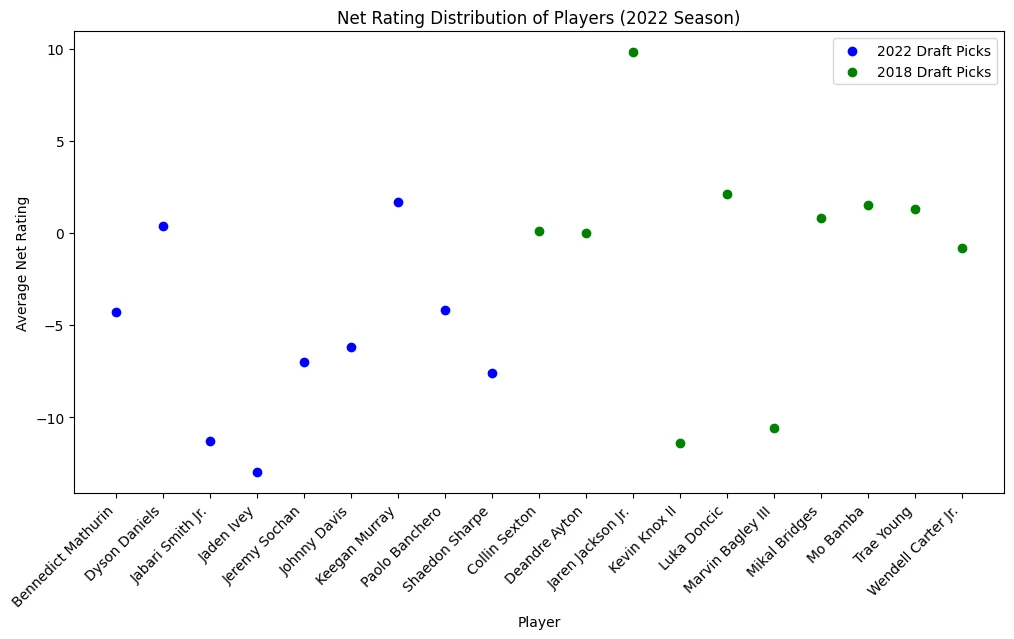
Original chart comparing average net ratings for 2022 and 2018 NBA draft picks in the 2022 season.Original source ↗
Comparisons and preparation
The Python scripts use pandas, NumPy, Matplotlib, and KaggleHub. Baseball analysis filters missing and zero-workload rows, derives experience groups, and normalizes counting statistics by plate appearances for comparison.
Quarterback comparison
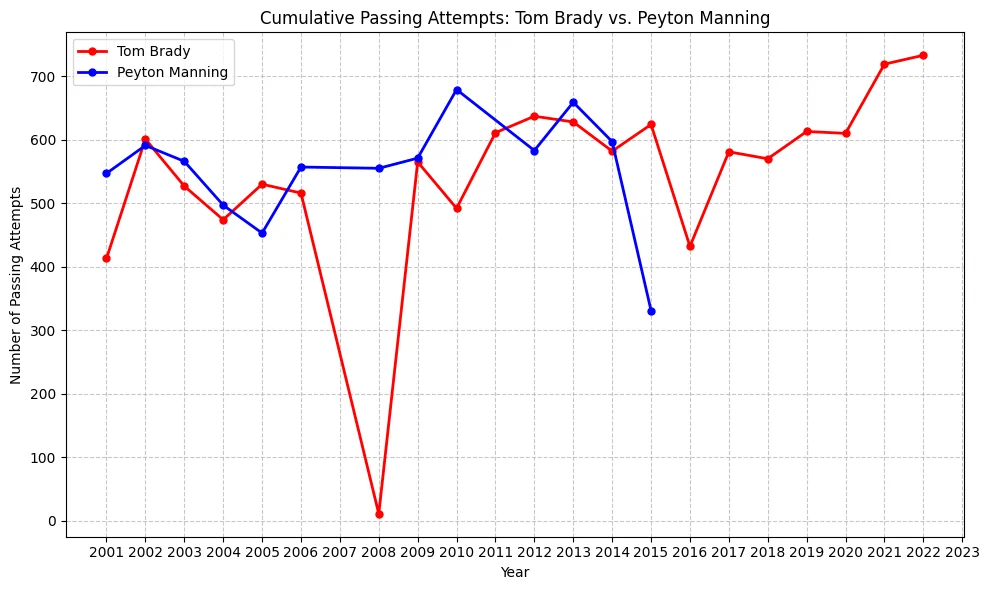
Original project line chart comparing Tom Brady and Peyton Manning passing yards.Original source ↗
An exploratory class project
Other saved plots compare conference passing totals, international and American NBA players, baseball experience groups, and workload by age. These are exploratory comparisons; they do not establish causal relationships or a predictive model.
Finna Visualizations
Data visualization work from my Finna Technologies internship. June–December 2023.
A tool for data scientists
At Finna Technologies, I independently developed a data visualization product for heart lesions and risk factors. Finna data scientists adopted the product during my software internship, before I started at Purdue.
The implementation
Built with HTML, CSS, JavaScript, and C#. The work centered on making lesion and risk-factor data easier to view. I do not have a verified user count or usage metric, and no proprietary screenshots are reproduced here.
SnuggleCuddle
Planning-stage exploration of squeeze sensing, Bluetooth, and a paired phone app.
Sending a hug
A concept for a stuffed animal that detects a squeeze or hug and exchanges signals with a paired phone. An optional vibration motor would let the animal receive a tactile response. This remains a hardware plan, not a completed device.
The proposed connection
Pressure sensor → Bluetooth microcontroller → native phone app. The phone would act as the internet gateway. The initial plan centers on a single force-sensitive resistor, a XIAO ESP32-C3, and a simple switched vibration motor.
Price and feasibility first
The planned sequence is to prove sensing, Bluetooth communication, and vibration separately before integrating them into a plush. USB power comes first; battery integration and custom hardware come later. No built prototype or product-launch claim is made.
The application starting point
The SnuggleCuddle repository currently contains an initial SwiftUI Xcode project with a Hello, world! screen, created in July 2026. The hardware and communication behavior above are planned, not implemented in that scaffold.
Vigil
An early Next.js experiment with Claude, tool calling, and stored context.
An assistant with tools
Vigil explores an AI assistant that can work with business information. The prototype has a prompt-and-reply chat screen, Markdown rendering, and a server route that connects the interface to Claude.
Beyond a text response
The repository includes a local tool runner for CSV-backed customer and receivables queries. It dispatches requested tools, sends results back to the model, and continues the conversation. These are experimental tools, not a claim of a deployed ERP integration.
Context and components
The code also explores Supabase-backed context storage, embeddings, and retrieval. TypeScript, Next.js, reusable UI components, and Storybook organize the interface. No established user base, benchmark, or production-readiness claim is attached to the prototype.
AI Wiki
A personal Markdown knowledge base for useful long-term AI context.
Context that lasts
AI Wiki is a personal, interlinked Markdown knowledge base. It records project context and evolving ideas so conversations with AI can have continuity rather than restart from scratch.
Structure and provenance
Pages use YAML frontmatter for titles, dates, tags, sources, and confidence, with wikilinks between related concepts. An index and change log track the library. The schema includes ways to flag contested facts and contradictions.
A small working library
The current source includes project pages for Perch and PracticeFlow and an AI collaboration page. This book describes the knowledge-base structure; private personal notes are not reproduced. It is a small context system, not a claim of automatic ingestion or autonomous upkeep.
Scholars Supply
A static HTML and CSS concept for a school-supply initiative.
A school-supply website
An early website prototype for Scholars Supply, framed around gathering supplies and resources for schools. The source contains a mission section, partner cards, contact content, and support buttons.
The original prototype
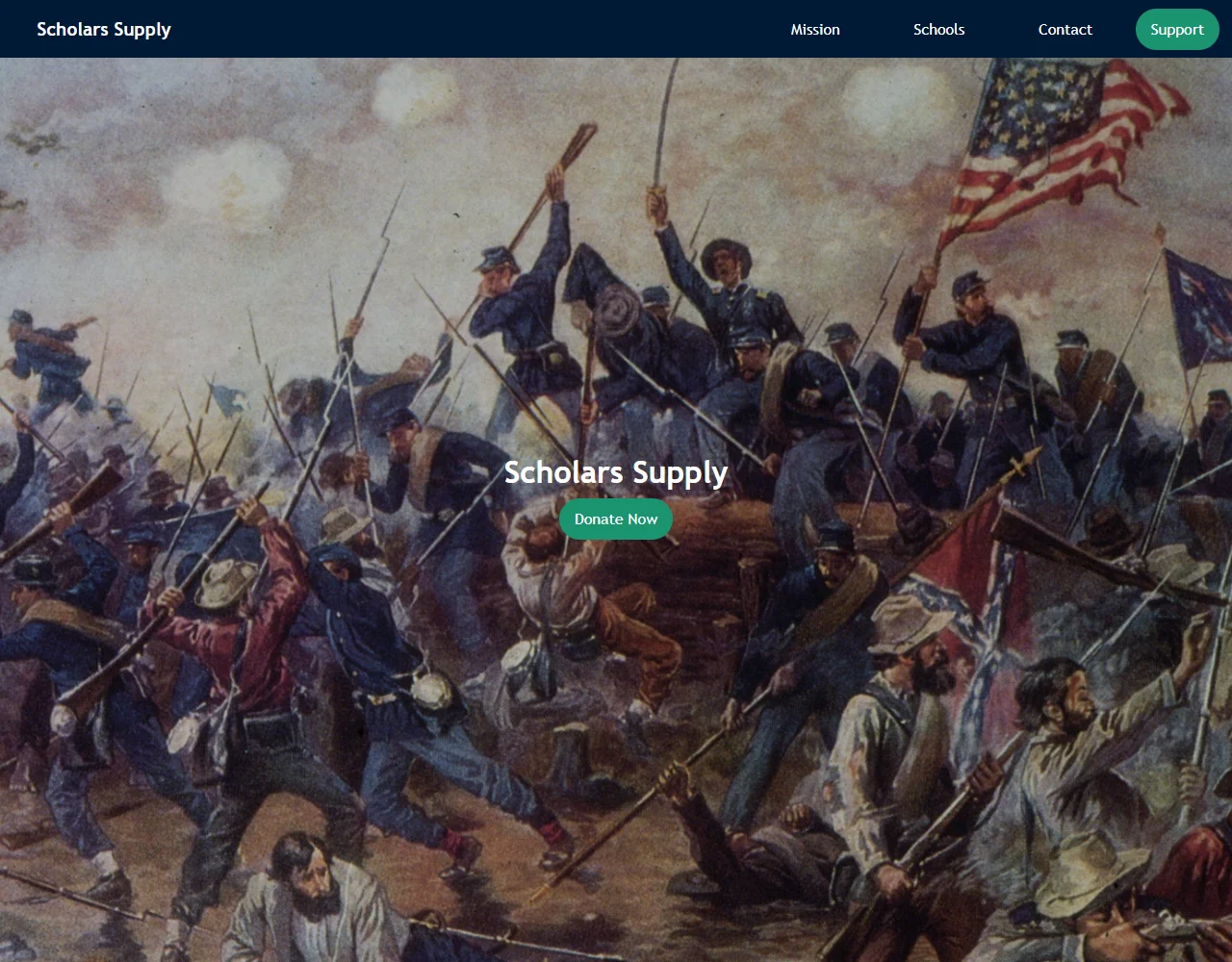
Local browser capture of the original Scholars Supply HTML/CSS prototype. Its sample partner and donation content does not establish real partnerships or a functioning donation service.
Prototype scope
Built with plain HTML and CSS. The archived page includes placeholder links and sample content; it is a web design exercise, not evidence of an operational fundraising platform or an implemented payment flow.
Statistics in R
STAT 350 coursework in data preparation and descriptive statistics.
Preparing review data
The R coursework reads an app-review dataset, inspects dimensions and missing values, removes selected reviewer fields, and writes complete records to a cleaned CSV. It also creates a log transformation of review length.
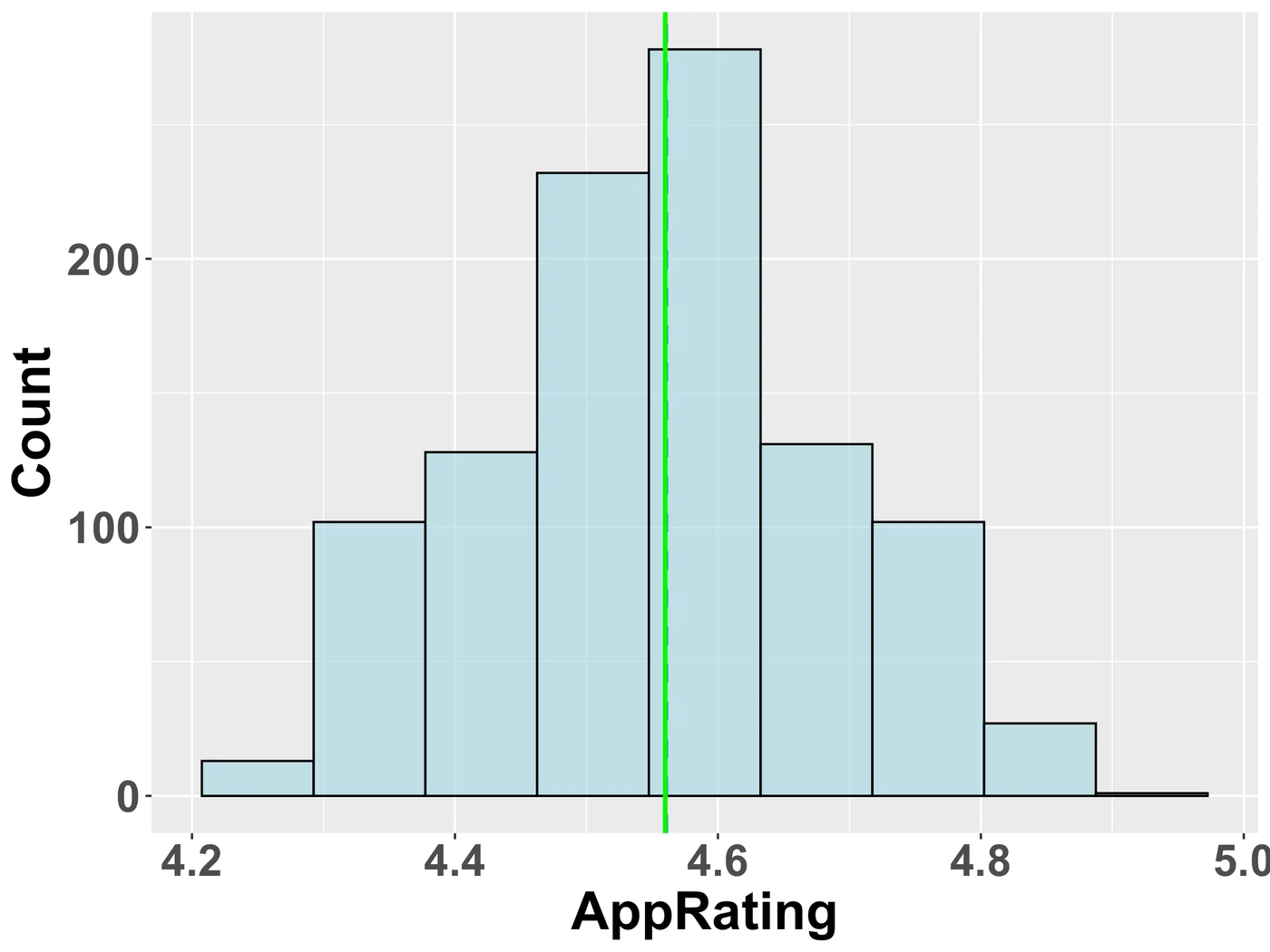
App-rating distribution
Original saved STAT 350 histogram of app ratings with mean and median markers.
Describing the distributions
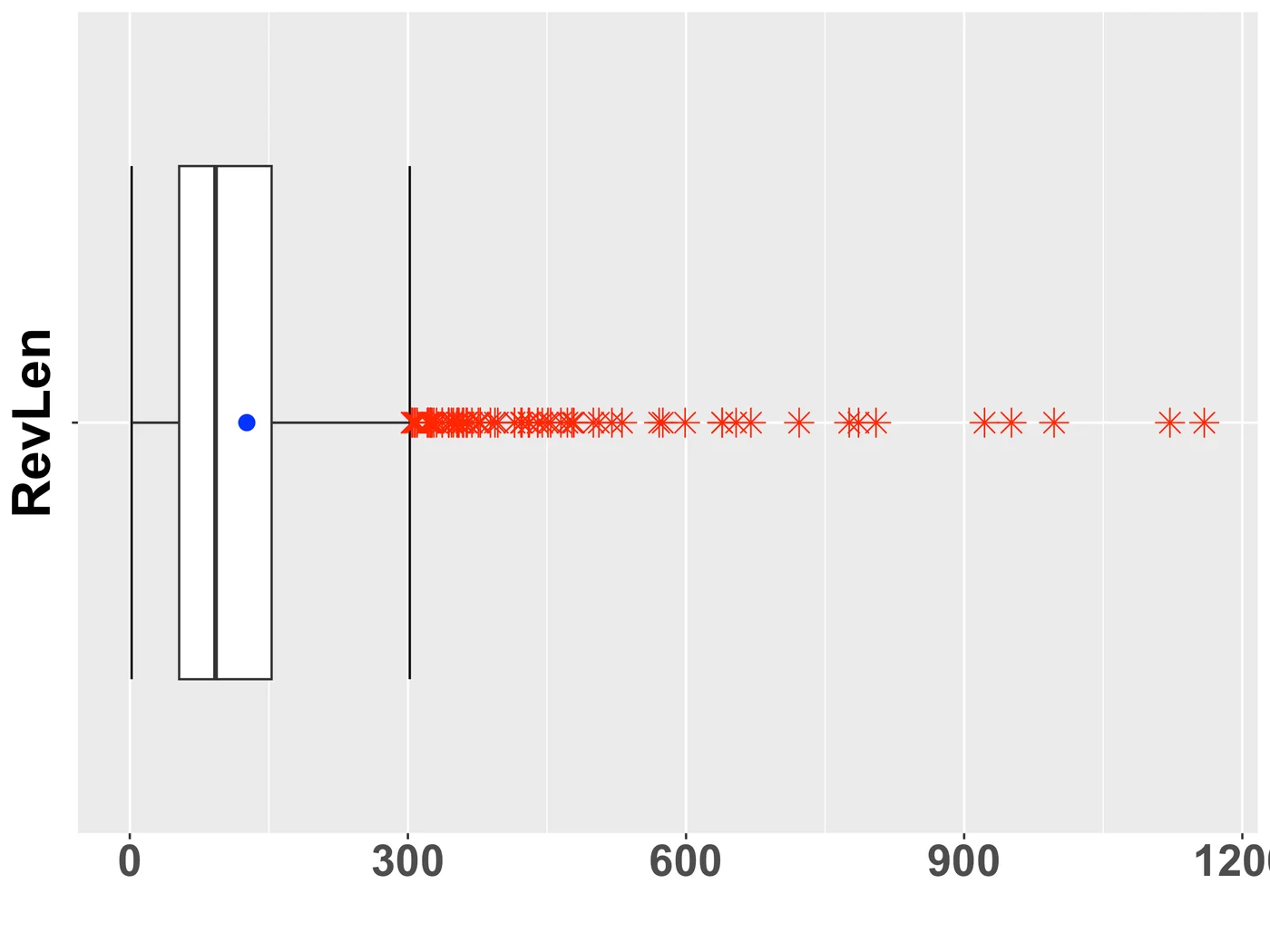
R and ggplot2 calculate quantiles, interquartile ranges, fences, outlier counts, means, medians, and standard deviations. Saved histograms and modified box plots explore app ratings and review length.
Review-length box plot
Original saved STAT 350 modified box plot of review lengths, with outliers and a mean marker.
Coursework scope
These are descriptive statistics assignments. Their value is the data-cleaning and analysis workflow, rather than a deployed app or a predictive model.
React Learning
A small React and TypeScript course exercise.
Learning the component model
A React, TypeScript, and Vite learning repository. The application renders a ListGroup component with a small set of place names.
State and events
The component uses useState to highlight the hovered item, maps data into list elements with keys, and demonstrates mouse-event handling and an empty-list state. This is a course exercise rather than a finished product.
This Website
A personal portfolio you explore by taking books off a shelf.
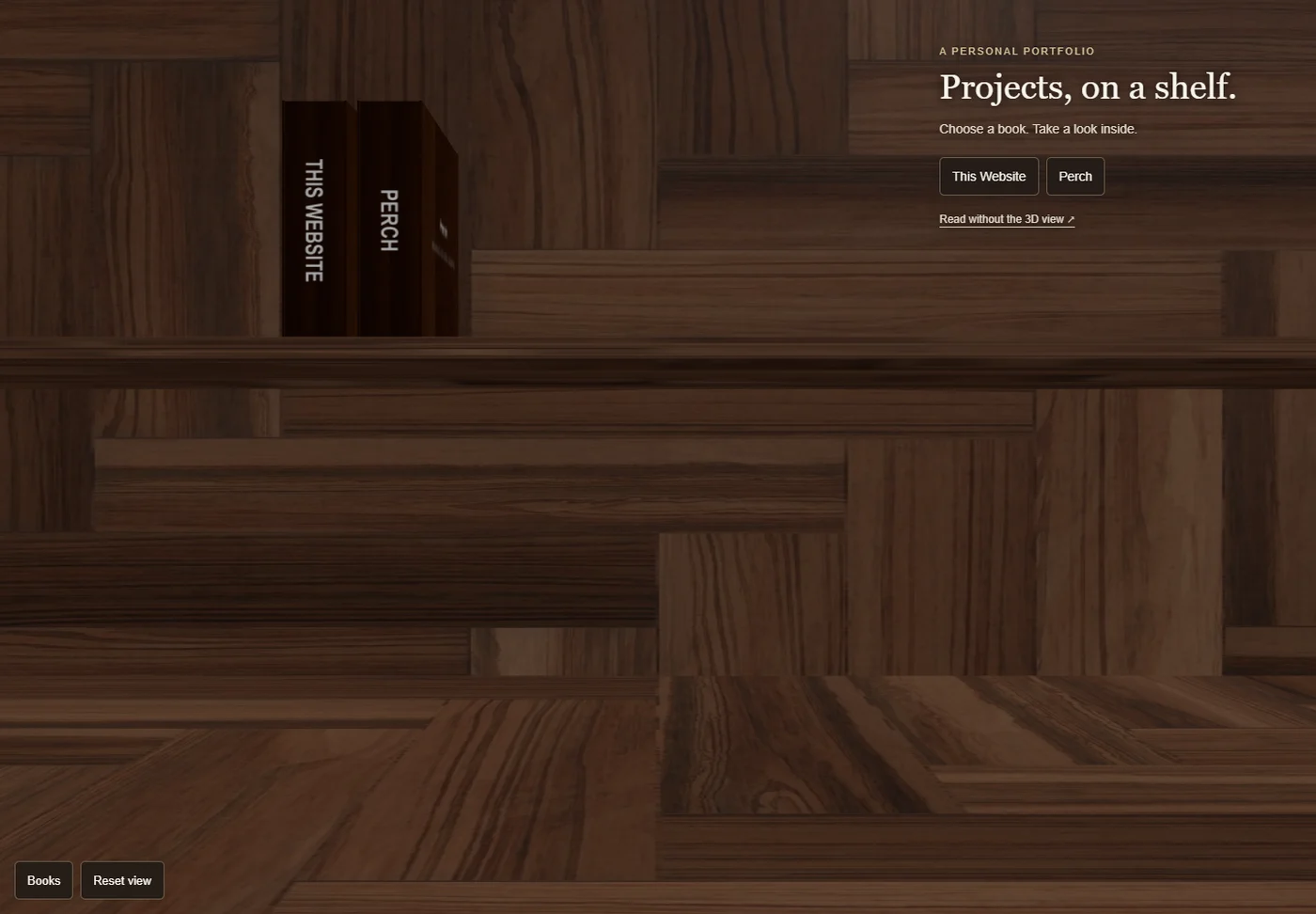
A personal portfolio built around a simple idea: each project is a book. Take one off the shelf, open it, and explore the work inside.
From prototype to Three.js
The desk, books, and materials began as a Babylon.js prototype. This version brings the same scene to Three.js, with animated covers and readable project pages.
Small by design
Plain JavaScript and Three.js, built with Vite. Shared models, smaller textures, and rendering only when something changes keep the experience focused.
Made to be explored
Use touch, a mouse, or a keyboard. Read details opens selectable text and links. A text-only project page is available without the 3D view.
Screenshot of the earlier live portfolio with books for This Website and Perch.Original source ↗
A growing project library
Each project has its own 3D book, with short chapters and original screenshots where available. The same records feed the selectable-text reader and the page that works without JavaScript or WebGL. Older experiments and partial contributions keep their actual status visible.